
10Tec ImageList OCX - Enhanced Design-Time Functionality
The 10Tec development team has enhanced the design-time functionality of the original vbAccelerator ImageList control to make it more user-friendly and give it a modern look in the latest versions of Windows, such as Windows 10 and Windows 11.
First of all, we changed the look and contents of the control on the form at design time. The control box of vbAccelerator ImageList in 10Tec's implementation became bigger and now displays the name of the control instance in addition to the number of uploaded images, their size and color depth.
Second, the ActiveX property pages dialog for the control has been restructured to enhance the efficiency of image manipulation. All image-related actions can now be performed on the initial default property page titled Images, eliminating the need to routinely switch between the Properties and Images pages in the original implementation:
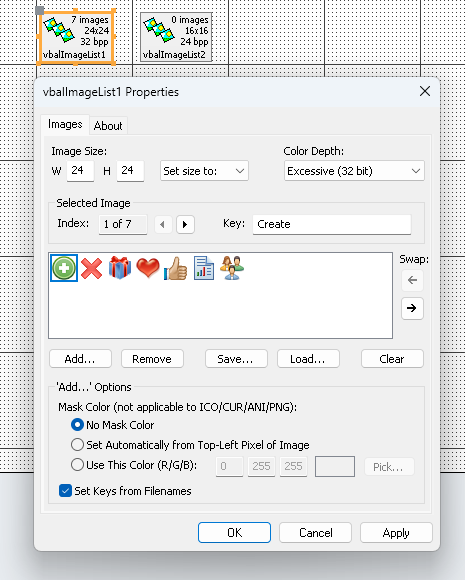
The functionality of controls in the Images property page was enhanced in many places. For instance, now you can upload images without specifying the mask color – in contrast to the original version in which you can only choose from the top-left pixel color or the specified color. Several new properties were implemented for this functionality and other features, and now all the aspects of the ImageList functionality can be controlled in the UI (the property pages dialog or standard property browser) and from code.
And notice that in the Modern Edition of ImageList ActiveX, all controls on the properties pages are rendered using the OS visual styles. You will no longer see outdated 3D element borders – their appearance matches the system interface of modern versions of Windows.